Waymark Español

AI travel planner for Android

Plan in minutes. Travel with everything at hand.

Waymark builds your day-by-day itinerary with AI, tells you what's missing before you leave and travels with you: what's next, how to get there, where to stay and what you've spent so far.

Coming soon toGoogle Play

See how it works
  • Free to start
  • Use it with or without an account
  • Made in Colombia, in Spanish and English

AI planning

From an idea to a day-by-day plan, with real places

Type something like "5 days in Mexico City, food and museums" and in about a minute every day is laid out, in order and at your pace.

  • Real places, opening hours and holidaysIt uses places from Google Maps, checks when they open and your destination's public holidays, and works out travel time between stops.
  • Plan by vibeShow it how you want to feel: a photo, a Pinterest screenshot or a few words like "calm, with a view, local food".
  • Edit it by chattingAsk the assistant to "make day 3 more relaxed" and the plan adjusts.
  • Import what you already haveA PDF, a Word document, a photo or some text becomes an itinerary you can edit.
  1. Share your idea

    Destination, dates, who's coming and what you love. Or import the plan you already have.

  2. Get a day-by-day plan

    Every day with real places, in an order that makes sense and with travel times.

  3. Fine-tune it and go

    Change anything by chatting, save your bookings and sync your calendar.

Saw an amazing spot in a Reel or a TikTok? Share it with Waymark and the places in the video are saved to your map.

A home screen that adapts

It changes with you: between trips, before you leave and on the road

Waymark's home screen knows where you are in your trip and shows what matters right now, not a menu of everything.

Swipe to see all three moments.

Between trips

It inspires you

  • Long weekends near you, with getaways ready to go.
  • Cheap flights from your city.
  • Events and things to do this weekend.
Before the trip

It tells you what's missing

  • Nights without a place to stay and days still empty.
  • Alerts when a flight's price drops.
  • Tours and plans for your days, on your travel dates.
During the trip

It's your day

  • What's next and how to get there, with an audio guide at each place.
  • A plan B when it rains.
  • Expenses from a photo of the receipt, and "I arrived safely" to let your people know.

Where to stay and what to do

All on the map of your plan

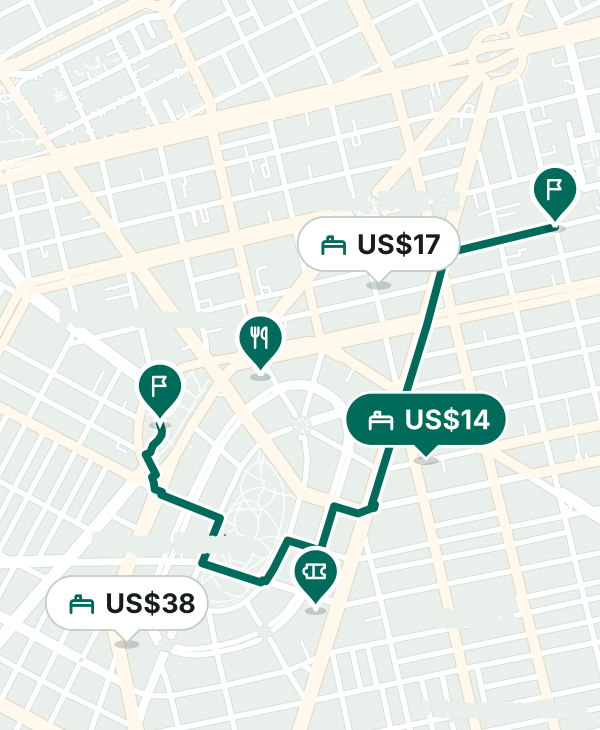
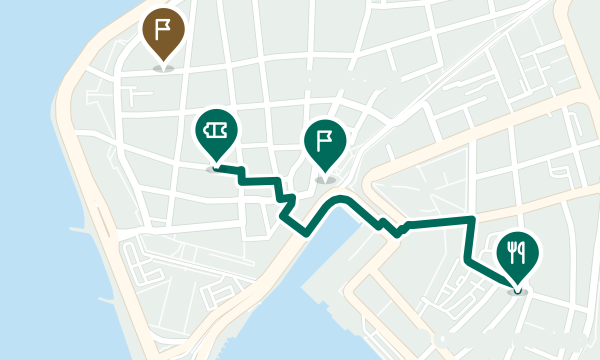
Waymark already knows where you'll be each day. So it shows you places to stay, tours, events and restaurants near your itinerary, not across town.

  • Hostels, hotels and guest housesSee how close each option is to the places on your days.
  • Tours for your plan's daysExperiences from Viator on your travel dates.
  • Events on your datesConcerts and shows from Ticketmaster at your destination while you're there.
  • RestaurantsWhere to eat near where you'll be.

Map: © OpenStreetMap contributors

Prices for your dates

See the price and choose where to book

Open a place to stay and you'll see what it costs for your dates, and you can jump to other sites without searching again.

  • Live price for your datesWhen a partner allows it, like Agoda, you see the nightly price and the total for your stay.
  • Compare on other sitesBooking.com, Trip.com or Expedia open with your dates and travelers already filled in, so you can compare yourself.
  • How close it is to your planMinutes on foot to the places on each day, so you pick the right neighborhood.

Waymark doesn't show every site's price: live prices come from partners like Agoda, and other sites open with your dates. Some links are from partners: if you book through them, Waymark may earn a commission.

Map: © OpenStreetMap contributors

Features

Your whole trip, in one place

From the first idea to the last memory, without jumping between apps.

Cheap flights and price alerts

See cheap flights from your city and follow the ones you like: we'll tell you when their price drops.

Events on your dates

Concerts and shows at your destination while you're there.

Tours for your days

Activities near what you've already planned each day.

From Reels to your map

Share a video from Instagram, TikTok or YouTube and save the places in it to your map.

Bookings wallet

Flights, stays and tickets with their QR codes, in time order and available offline.

Your calendar, up to date

Every activity becomes an event with its address in your calendar, such as Google Calendar. Change the plan and it updates itself.

Between cities

How to get from one city to the next, with estimated times and costs for each option.

Travel as a group

Share the plan with your people, decide with polls and track shared expenses so everyone knows who owes what.

Coming soon

People

Join group plans at your destination and meet other travelers, with clear rules and tools to keep you safe.

Read the community guidelines

Memories worth sharing

A video of your trip made on your phone, your year in travel and a map of the places you've been, with badges to unlock.

On the road

A copilot that travels with you

Once you're there, Waymark talks to you, guides you and looks out for your people.

Voice copilot Pro

Ask out loud for whatever you need on the trip, hands free.

Audio guide

Listen to the story of each place on your plan as you walk through it.

Automatic plan B Pro

If it rains or something closes, it suggests an alternative nearby without breaking your day.

Expenses from a photo

Snap the receipt and Waymark reads the amount and saves it to your trip's expenses.

"I arrived safely"

One tap lets your people know you got there, with your location if you choose to share it.

Home-screen widgets

The countdown to your next trip, or your next stop and when to leave, without opening the app.

Safety and privacy

Your trips are yours

We ask only for what we need, explain why, and let you take it with you or delete it whenever you want.

  • With Google, or no accountSign in with your Google account to sync and share, or use Waymark without an account and your trips stay on your phone.
  • We don't sell your dataNor do we use it for advertising. The AI gets only what it needs to answer you.
  • Download it or delete itDownload your data or delete your account from the app, in Profile → Settings.
  • Permissions only while in useThe microphone is used only while you talk to the copilot, and the calendar only for your trip's events.
  • Your photos stay with youThe photos you pick for your recap videos never leave your phone.
  • "I arrived safely"One tap lets your people know you got there, with your location if you choose to share it.

Plans and pricing

Start free. Upgrade when you travel more.

Waymark is free with daily limits. Pro and Ultra raise those limits and add features.

Billing period

Free

$0 forever

To plan your next trip and try everything.

  • AI plans and assistant, with a daily limit
  • Bookings wallet and calendar
  • Small groups with polls and expenses
  • Trip video with a watermark and your year card

Ultra

USD 9.99 / month

USD 79.99 / yearAbout USD 6.67 a month

For people who travel all the time or plan for everyone.

  • Everything in Pro, with much higher limits
  • More voice copilot minutes
  • Audio guides narrated in a natural voice
  • The biggest groups
  • Extra music for your videos

Trip pass

Taking just one trip? Everything in Pro for that trip for 30 days, with a one-time payment and no subscription.

USD 5.99 one-time

  • Prices in USD; Google Play shows your local price.
  • Cancel anytime from Google Play.
  • Each plan's exact limits are shown in the app before you buy.

FAQ

Questions people ask us

When can I download Waymark?

Very soon. We're finishing testing so we can publish it on Google Play.

Is there an iPhone version?

For now, Waymark is Android only.

How much does it cost?

You can use Waymark for free with daily limits. Pro is USD 4.99 a month or USD 39.99 a year, and Ultra is USD 9.99 a month or USD 79.99 a year. Taking just one trip? The trip pass is USD 5.99 and gives you Pro for that trip for 30 days. Google Play shows the price in your local currency.

Do I need an account?

No. You can use Waymark without an account and your trips stay on your phone. If you sign in with Google, your trips are saved in the cloud so you can sync and share them.

Does it work offline?

Your itinerary and the passes in your wallet can be viewed offline. Planning with AI, searching for places and checking prices need an internet connection.

Where do the places in my plan come from?

Waymark uses real places from Google Maps and checks their opening hours and your destination's public holidays. If something doesn't fit, it tells you so you can change it.

Do you show prices from every booking site?

No. The live price for your dates comes from partners that allow it, like Agoda. Other sites, such as Booking.com, Trip.com or Expedia, open with your dates so you can compare there.

How does Waymark make money?

Through the Pro and Ultra subscriptions, the trip pass and some partner booking links that may pay us a commission. We don't sell your data.

What is People?

It's a space coming soon where you can join group plans and meet other travelers safely. You can already read the community guidelines.

How do I delete my account and data?

In the app, under Profile → Settings. We also explain how on this page.

Your next trip starts here

Waymark is coming to Google Play very soon. Start thinking about where you want to go.

Coming soon toGoogle Play